How to Redesign Existing Software and HMI Interfaces Without Losing Workflows or Status Feedback
If existing software works, begin an interface redesign by recording frequent tasks, role permissions, inputs and outputs, and exception feedback. Then define how far the current change should go. Pages and controls can be reorganized, but the existing business decisions and operational results need to be preserved on a documented basis. For HMIs and equipment-monitoring software, a UI upgrade does not automatically include changes to PLCs, DCSs, device drivers, or control logic.
On this page7 sections
Save the old screens and the complete task flow
A few screenshots of normal states do not explain how the original software works. Choose a frequent task—such as finding a record, switching devices, viewing an alert, adding a note, or exporting a result—and run through it as each actual user role. Record the entry point, inputs, returned information, and completion signal. Include cancellation, lack of permission, empty data, and network interruption.
Build a baseline in the form “role—task—original entry point—steps—expected result—special states,” linked to authorized screenshots or recordings. Also record familiar behaviors such as keyboard shortcuts, barcode input, focus order, default filters, table columns, and print formats. Do not remove a working entry point solely because it looks dated.
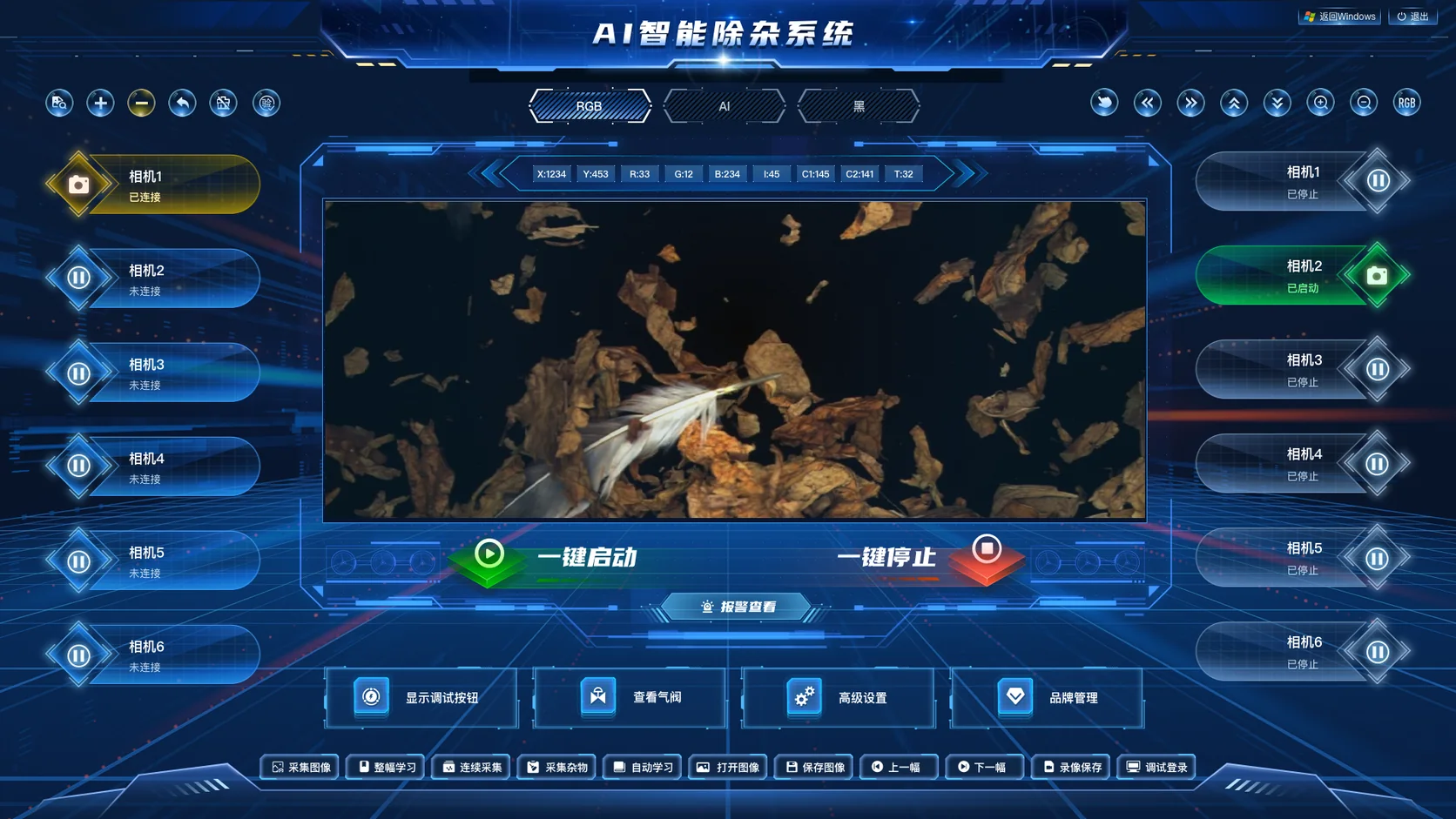
For example, this inspection workstation case image (Chinese) separates the image, connection state, and start/stop status. When evaluating a similar UI upgrade, ask which content changes with the camera selection, which controls remain available while disconnected, and which image is saved. A screenshot reveals entry points to check; actual behavior still needs confirmation against the original software and interface documentation.
Price visual polish, information structure, interaction changes, and frontend replacement separately
A “UI upgrade” may mean visual consistency or a complete frontend rewrite. Define which changes are in scope so designers and developers work from the same agreement. Even a design-only engagement should deliver the necessary state descriptions for the existing development team to implement accurately.
Scroll horizontally to see the full comparison table.
| Redesign layer | Work it may include | Boundary to confirm separately |
|---|---|---|
| Visual polish | Unify typography, spacing, colors, icons, and component appearance. | Preserve state meanings and readability; check existing business conventions before changing colors. |
| Information structure | Navigation, page groups, field hierarchy, and table and detail layouts. | Where old entry points move, and whether filtering, location, and return paths still work. |
| Interaction changes | Reduce repeated input and add validation, feedback, confirmation, and recovery paths. | Whether changes to approvals, permissions, and business rules are part of this scope. |
| Frontend replacement | Implement new pages, connect agreed interfaces, and adapt to the target runtime. | Check existing frameworks, components, interfaces, and local dependencies; scope backend, driver, and control changes separately. |
An old interface does not automatically justify rewriting the entire system. Test whether the current framework can support the target design on one representative page, then decide what to retain, replace in part, or rebuild. Conversely, if display logic is tightly coupled to device communication, a mockup alone cannot support a promise that “only the skin needs changing.”
Design loading, failure, disabled, and pending-feedback states
A normal page describes only ideal conditions. For each key task, the redesign should show its current state, available actions, expected feedback, and next step. Buttons may look consistent, but users need to understand why a particular action is unavailable.
Scroll horizontally to see the full comparison table.
| State | What the new UI should convey | What to check against the original |
|---|---|---|
| Loading | Which object is being read and whether previous content stays visible temporarily. | After switching objects, could an old result be mistaken for the new object's data? |
| No data | No records match the current conditions, or data has not yet been supplied. | Do not show interface failure or lack of permission as “No data.” |
| Failure | Which step failed, what outcome is known, and how to continue. | Could retrying write the same item twice? If the result is uncertain, check it first. |
| Disabled or no permission | Which permission or prerequisite is missing and whether the reason can be viewed. | Keep permission checks consistent with the original; merely graying out a button is not enough. |
| Submitted, awaiting feedback | The request was sent, but the business outcome or device response is unconfirmed. | Do not mark a task complete simply because the click succeeded, or submit it again blindly. |
| Alert seen, acknowledged, and resolved | Show the distinct event and response states available in the original system. | Do not collapse closing a dialog, acknowledging receipt, taking action, and recovery into one state. |
For example, Part 9 of the OPC UA alarm model uses AcknowledgeableConditionType to distinguish AckedState from an optional ConfirmedState. Its confirmation model uses the latter to distinguish awareness of an event from having taken a response action;AlarmConditionType uses ActiveState separately to indicate whether the abnormal condition still exists.
These terms illustrate why states must not be confused. They do not require every application to adopt those field names, nor do they imply that the case shown uses OPC UA. Base the redesign on the original system's state dictionary and actual interfaces. Review transitions, action conditions, and copy together so visual consistency does not erase business meaning.
Use a hypothetical task to check that behavior is preserved
The following is an instructional interaction comparison, not the outcome of a client redesign. Suppose an operator needs to find a record, open its details, and save a note. Compare the old and proposed interfaces step by step using the same role and sample:
Scroll horizontally to see the full comparison table.
| Hypothetical original interaction | Proposed presentation | Behavior to preserve or agree on |
|---|---|---|
| Filters are scattered; search returns a results list. | Group common filters and show a summary of the current selection. | Rearranging controls must not change the search scope, defaults, or results; preserve selected filters when returning to the list. |
| Clicking a record opens a detail dialog that is temporarily blank while loading. | Show the record identity and a loading indicator, then the details. | If records are switched rapidly, a late response must not overwrite the currently selected record. |
| After saving a note, wait for a response. | Distinguish ready to submit, submitting, success, and failure. | Keep saved content, permissions, and returned result aligned; if a timeout leaves the outcome uncertain, verify it before resubmitting. |
The comparison asks whether the same inputs produce agreed results and whether required confirmations, validation, and permission checks remain. If the team wants fewer steps or different defaults, treat that as an explicit interaction change for business users to approve, then update regression cases. Do not hide it under “visual polish.”
Adapt to target devices while keeping content readable and operable
An older HMI may run in a fixed window, touchscreen, or specific operating system. Business software may depend on scanning, keyboards, printing, or local files. Record the actual runtime before redesigning. If moving from a desktop application to a browser, validate those dependencies separately rather than inferring the technology from its appearance. For physical dimensions, output ratio, and viewing distance, see the screen resolution and adaptation guide.
For web interfaces, the W3C's WCAG 2.2 guidance on reflow emphasizes preserving information and functionality as the viewport narrows or content is enlarged, with exceptions for parts that require a two-dimensional layout, such as certain charts and tables. An exception for such content does not justify making the rest of the page's explanatory text hard to read.
Give complex flowcharts or data tables their own viewing area while allowing explanations, forms, and feedback to wrap normally. On touch devices, test whether buttons, scrolling, and dialogs interfere with each other. Where a keyboard is used, check focus and return paths. Confirm adaptation on the target devices; one mockup does not prove every device works.
Replace one group of pages first, then check each batch against the same tasks
Choose a representative group of pages with clear dependencies. Finish design and runtime validation for that group before expanding the scope. A practical sequence is:
- Define the pilot: Select roles, pages, sample inputs, functions that must remain, and behaviors that may change; save the old baseline.
- Validate the design: Cover normal and exceptional states, and ask actual users to confirm field placement, action order, and the meaning of prompts.
- Compare runtime behavior: In the agreed test environment, use the same roles, samples, and tasks to compare old and new results, permissions, logs, and failure paths.
- Agree on release conditions: Record versions, affected pages, deployment window, open issues, and rollback criteria. Preserve verified shared components and behavior agreements between batches.
Viewing old and new pages side by side helps comparison, but operations that write business data or affect equipment should run through the designated entry point to avoid duplicate triggers. If backend data structures change, confirm compatibility and rollback conditions too. Keeping an old page file does not necessarily restore the complete business environment.
Possible deliverables include a page-and-behavior inventory, prototypes and editable designs, component state specifications, implementation for agreed pages, test records, and a release plan. Actual delivery depends on whether the project covers design only, design and implementation, or broader changes; these are options, not a fixed list already delivered in every project.
Beijing Hongshan Technology can assess interface design and development for existing dashboards, business software, and HMIs, across industries. First review the engagement scope for design only, existing-interface redesign, and frontend implementation (Chinese). If business functionality must also change, compare the custom software development service (Chinese).
Frequently asked questions
Can an interface be redesigned without the original software source code?
The workflow, prototype, and visual design can be planned first. Whether the running page can be modified directly depends on the existing interface's extension capabilities, APIs, and authorization. After assessment, identify any part that requires the original developer or a new implementation; screenshots alone cannot justify promising a direct replacement.
If we only want a clearer interface, must we replace the backend or device control program?
Not necessarily. First assess visuals, layout, and status prompts while retaining existing business and control responsibilities. If implementation does require backend, driver, or control-logic changes, confirm those as separate work.
How do we know the new UI is easier to use without losing old functions?
Run the same roles, samples, and tasks through both versions. Check results, permissions, and exceptional states, and record steps to completion, user errors, and feedback from actual users. Usability and functional preservation need separate evidence; visual preference alone is not enough.