How to Locate a Stalled Warehouse Task: Mapping WMS, WCS, Bins, and 3D Equipment
When a warehouse task appears “stuck,” check the business task in WMS, execution feedback in WCS, and the relationship between storage bins and equipment separately. The 3D scene helps locate these objects; the page should also retain state sources, task IDs, and update times. An unfinished order, idle device, and network outage can occur together and cannot be collapsed into one red-or-green status. Organizations with WMS and WCS can begin with one outbound flow, decide who needs to investigate which exception, and then scope development.
On this page7 sections
Why orders, tasks, and equipment feedback must stay separate
One business order may split into several warehouse operations. An operation may itself have partial execution, cancellation, or retry records. The actual hierarchy depends on the existing systems. Before integration, ask the WMS and WCS owners which ID names the business request, the operation, and the equipment execution, and whether their relationships are one-to-one or one-to-many.
For example, Microsoft Dynamics 365 work details separately store state, item, bin, quantity, load, and shipment identifiers; work templates can split work by conditions. This illustrates why procurement must verify work levels and linking fields. Other systems should use their own data dictionaries rather than copying product fields. See Microsoft's work-details guide and work-template and location-directive guidance.
WMS, WCS, and equipment platforms provide authorized business states and execution feedback. The visualization layer presents sources, differences, and location entry points as agreed. If the scope includes issuing or canceling commands, define the original system's API, permissions, and execution confirmation separately. A page button is not evidence of equipment-control authority.
How tasks map to bins and 3D equipment
Record original system codes before page objects. Model node names may change; business links need a maintained mapping table so a replacement model still resolves to the original equipment record. These fields are planning suggestions, not any vendor's API specification.
Scroll horizontally to see sources and mappings.
| Object | Keep these fields | Link to | Use on the page |
|---|---|---|---|
| Business document | Source system, document ID, line ID | One or more warehouse operations | See business progress and affected details |
| Warehouse operation | Task ID, type, business state | Document, origin and destination bins, execution records | Open exception detail from pending tasks |
| Execution record | Execution ID, linked task, source feedback | Device, segment, or retry relationship | Separate current execution from earlier attempts |
| Storage bin | Warehouse, zone, original bin ID | Business address and location object in the scene | Locate origin, destination, and related tasks |
| Equipment | Device ID, state source, update time | Execution record, equipment file, model node | Locate a stacker crane or conveyor from the task |
Verify links using original IDs before adding labels, color, and 3D highlighting. If a task lacks a device ID, show “Equipment link pending” while leaving its business record accessible; do not guess a device from a similar name. Extend the object, asset, point, and page mapping table (Chinese) with warehouse task and execution relationships.
Hypothetical example: viewing a canceled and retried task
Teaching example: O-01, T-01, E-01, E-02, A-01, B-01, and S-01 below are fictional IDs. The event sequence illustrates page behavior, not a client's production records, and does not imply every WMS/WCS supports the same process.
Suppose order O-01 links to operation T-01, moving goods from bin A-01 to B-01 using device S-01. The original system assigns E-01 to the first execution. After cancellation is confirmed, it creates E-02. Define the distinction between a “cancel request” and “cancel confirmation” before reviewing the following display sequence.
- Create task: WMS supplies T-01's business state and the page shows source and destination bins. Until execution feedback arrives, show “Awaiting feedback” in the execution area.
- First execution: After feedback for E-01 linked to T-01 arrives, the task detail can locate S-01 and show the device state timestamp.
- Request cancellation: Retain the cancellation request and later confirmation for E-01. Do not mark the task “Cancellation complete” before confirmation.
- Retry execution: When the original system creates E-02, point the current-execution entry to E-02 and keep E-01 in history. Do not overwrite all execution history under T-01.
- Check completion: If E-02 reports execution complete but WMS has not updated, show both states and timestamps side by side and flag the business state for review.
Highlighting S-01 answers only “Which device should I inspect?” Whether the move succeeded, inventory was written back, or the task closed must be checked in the original system authorized to confirm each fact. If cross-system events lack a clear link or order, preserve the discrepancy rather than inventing a business conclusion on the page.
Preserving state and time when older feedback arrives
Receiving a message most recently does not mean the equipment state changed most recently. Distinguish source-event time, platform-receipt time, and last successful update. A late E-01 result must not overwrite E-02's current state solely because it arrived last. Check execution IDs, event sequences or versions, and the agreed ordering and replay rules.
If the path uses OPC UA, the OPC Foundation DataValue definition provides a value, StatusCode, source timestamp, and server timestamp. StatusCode describes the condition of the provided data, not “task complete” or “device running.” Confirm the actual protocol, quality fields, and time rules from the project's API materials.
When data exceeds the agreed freshness window, the page may retain the last known state but should show “Update pending,” source time, and reason for missing updates. Do not present an old “running” state as currently normal or substitute zero for a missing task count. Set freshness thresholds from operating cadence and site conditions; a page animation does not prove data validity.
Test four task exceptions first
De-identified samples can validate information structure during prototyping. During integration, use authorized APIs and test records to verify actual behavior. These checks concern the page and relationships; equipment dispatch and control tests are the responsibility of designated owners under the project agreement.
Scroll horizontally to see exceptions and evidence.
| Exception | How the page should express it | Evidence to check |
|---|---|---|
| Task split or retry | Preserve the link between an operation and several execution records, separating current from historical. | Link fields, original system records, execution version or sequence. |
| Cancellation not confirmed | Show request and confirmation as different stages, retaining source states. | Cancellation request, confirmation or rejection, and their timestamps. |
| Equipment or bin not mapped | State which link is missing while keeping business detail accessible. | Bin register, equipment IDs, and model-object mapping table. |
| Delay, outage, or replay | Mark stale and historical feedback, then verify the current record after recovery. | Original times, receipt logs, replay rules, and recovery result. |
For complete testing of points, timestamps, disconnection recovery, and authorization, see the industrial real-time data integration and acceptance guide.
What public warehouse cases can show
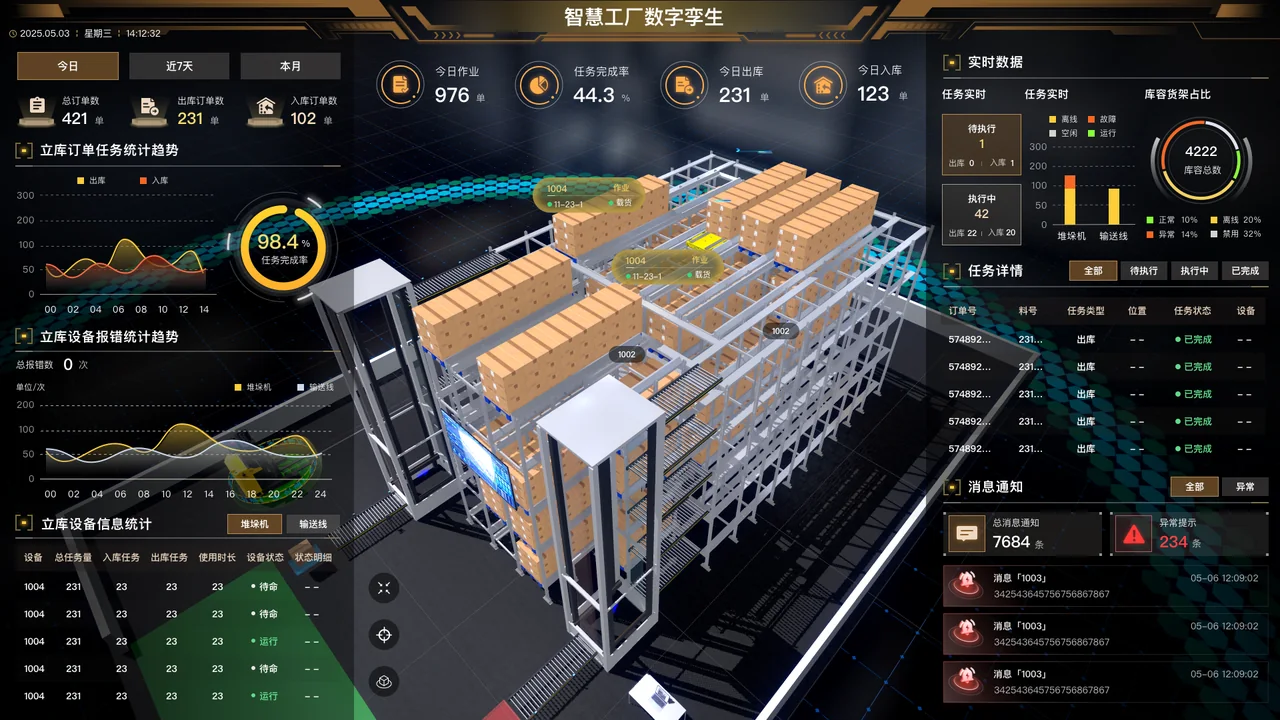
The smart factory warehouse digital twin case (Chinese) publicly states that project source files, code, and 3D models were delivered. Clients can use it to examine page organization and delivery scope. Evaluate the proposed project's WMS/WCS, engine, API behavior, and equipment-control conditions separately.
Materials and deliverables to define before development
Begin with one de-identified inbound or outbound operation, WMS/WCS field and state descriptions, bin register, equipment list, site plan or existing model, and target device. If materials are incomplete, record the missing links, owners, and task flow that can be covered first.
An initial scope can include task list and detail design, 3D object location, approved API adapters, state and timestamp display, and comparison with exception samples. List pages, API mapping, model scope, deployment and maintenance documents, and a verification method for each. Confirm project source files, code, and models individually if they are required deliverables.
Start with the warehouse logistics visualization solution (Chinese), then use the API and sample-data preparation checklist (Chinese) to organize inputs.