Multi-Camera Industrial Inspection: Linking Original Images, Results and Review Records
For multi-camera inspection traceability, first identify each inspection event, then connect its station, workpiece or batch, camera frames, recognition results, algorithm or rule version and human review. Do not pair an original image and a result merely by “most recent image” or arrival time. This article explains records and views for an inspection workstation when cameras, an algorithm service or an inspection system already exist and the project needs a better interface and business traceability.
On this page7 sections
Decide whether you are tracing a workpiece, batch or inspection event
“Find this batch” and “find this inspection” are different actions. A batch may pass through multiple stations; one workpiece may be recaptured or reinspected. Distinguish the business object, which establishes ownership, from the inspection event, which records the images and results generated at a station on a specific pass.
If workpieces have IDs, link each ID to its inspection events. If material moves continuously without individual IDs, production and inspection owners must agree whether tracing is by batch, station, capture segment or trigger event. Without an individual identity, do not call a time-based image search item-level traceability.
If inspection objects, tasks and reinspection are not yet mapped, start with the industrial inspection data preparation guide to organize existing fields. This article then addresses how those objects link to specific images and results.
Attach multi-camera frames to the same event without mismatches
One inspection may have several camera frames or repeated captures. Keep the event ID supplied by the source system, camera ID, frame or capture ID and capture time. Whether cameras share a trigger ID and how their frames join one event depend on equipment and interface conditions. Time helps order and check records, but should not be the sole join key.
Scroll the table horizontally to see the full comparison.
| Recorded object | What to retain | Problem it solves |
|---|---|---|
| Business object and inspection event | Workpiece or batch, station, event ID and initial/reinspection relationship | Identify one inspection rather than all images in the batch. |
| Camera and capture frame | Camera ID, source frame ID, capture time, original-image reference and capture state | Check the exact view while retaining missing-frame, recapture and unavailable-image states. |
| Recognition result | Result ID, linked frame, result time, decision and algorithm or rule version | Prevent a late result from overwriting another frame and explain decisions across rule changes. |
| Equipment feedback and human review | Linked event, feedback source, reviewer, time, decision and reason | Track subsequent actions and human judgment separately while retaining the original result. |
These relationships are for project confirmation; suppliers need not use the same field names. If the source system has no stable ID, agree on association and duplicate-handling rules, then test outages, retransmission and process restarts. Do not guess pairings in the page.
View original images, results and rule versions side by side
Organize an inspection detail page around one event: the business object, station and state at the top; each camera's original image with its matching result in the middle; result time and algorithm or rule version alongside; capture, result arrival, equipment feedback and human review below. Switching cameras must switch both the image and its matching result, not just the picture.
An annotated result image helps review, but keep a verifiable reference to the original. If an image has been resized, cropped or rotated, confirm which version the annotation coordinates use. A frame with no returned result should show pending or unavailable; do not fill it with marks from another frame in the batch.
Here is a fictional record to explain the relationships: event E-101 is at station S-A. Camera C-1 creates frame F-21, and C-2 creates F-34. Even if the result for F-34 arrives first, show it under C-2 using the identity carried by that result. Keep C-1 pending until the F-21 result arrives. If F-21 is later rerun under a new rule, create a new result record and retain the original instead of silently rewriting the old decision.
The rule version may refer to an algorithm model, recipe, threshold configuration or inspection program; use the source system's terminology. For every historical inspection, show the version actually used, not the current latest version.
Separate result readiness, reading and equipment action
An algorithm service producing a result, a receiver reading it, a control system acknowledging it and an actuator responding are distinct stages. Show only stages for which evidence exists. Receiving a recognition result does not automatically mean an item was rejected. If there is no equipment-feedback API, trace to the last known stage and identify the system or person who checks what happens next.
Cognex In-Sight ViDi result-reading documentation uses an In-Sight to ControlLogix PLC EtherNet/IP connection as an example: multiple results can be buffered and sent individually using ResultsValid and InspectionResultsAck. The documentation recommends reading when ResultsValid indicates readable data. This illustrates why reading time and acknowledgement need defined meanings. The fields and mechanism apply only to the relevant product configuration; they do not imply this site's case uses Cognex, nor that read acknowledgement proves physical sorting succeeded.
For other cameras, algorithm services or PLCs, have the supplier define result validity, read acknowledgement, duplicate messages and feedback. During interface integration, preserve record relationships; equipment triggers, timing and safety controls remain with their responsible owners. For general outage and timestamp checks, see the industrial real-time data integration guide.
Keep the machine's original decision and reasons for human overrides
A human review should not overwrite the machine's first decision. Retain the original image, result and version, then append the reviewer, time, decision and reason. A recapture creates a new inspection event linked to the first one. This makes it clear what the first judgment was and why it changed.
Scroll the table horizontally to see the full comparison.
| Situation | Suggested interface behavior | Record to retain |
|---|---|---|
| Late or duplicate result | Attach it to the original event; handle duplicates under an agreed rule, not by pairing with the current screen. | Source result ID, linked frame, arrival time and handling state. |
| Recapture or reinspection of one object | Distinguish the first and later inspections and allow side-by-side review. | Images, results, versions and relationships for every inspection. |
| Human override | Keep machine and review decisions together, with reason and operator. | Review evidence, time, permissions and before/after records. |
| Missing original image or expired retention | Mark the image unavailable instead of showing only a broken-image icon. | Retention rule, image state, available results and handling notes. |
Business and IT owners should jointly define review permissions, image-retention periods, sensitive information and export scope. If problem samples enter a training workflow, define annotation, approval and model-release responsibilities separately; an “auto-learn” button cannot replace those records.
What a real inspection workstation shows, and what still needs design
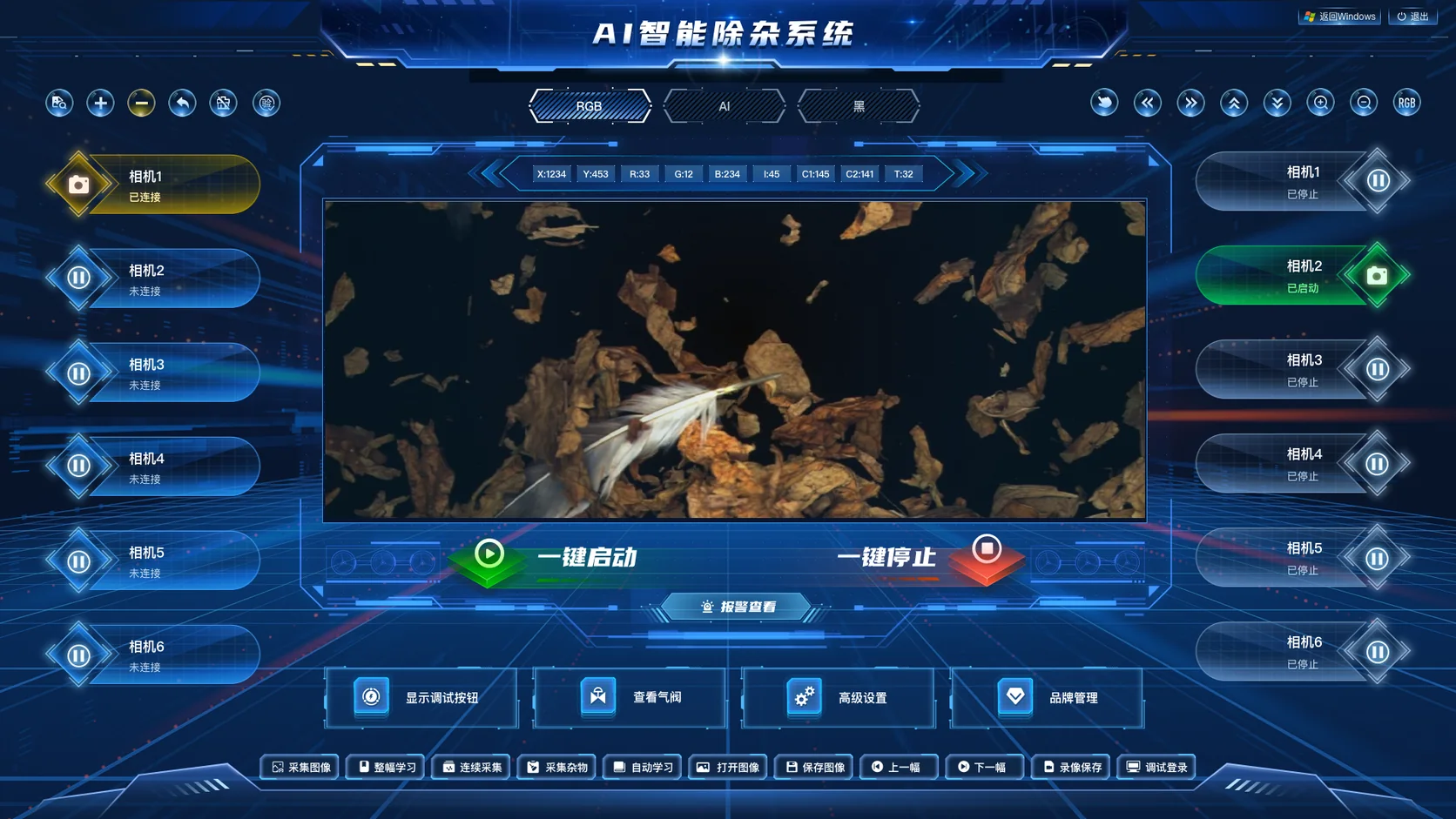
AI-Powered Impurity Detection shows how images, camera states and controls can be organized. The screenshot does not establish that every camera is connected, prove recognition accuracy or demonstrate sorting performance. The event, frame, result-version and review relationships in this article are proposed for traceability; they should not be presented as existing features in the pictured system.
For a project with existing camera and algorithm vendors, start with one de-identified inspection record: provide its original image, example result, existing IDs, workstation screenshot and the exception you most want to investigate. Possible deliverables include event relationships and field definitions, an original/result comparison page, review workflow, interface adaptation and test records for exception examples. Decide separately whether algorithm training, camera changes, control code and on-site sorting integration are included.
For overall scope, compare the Industrial Inspection Data Management Solution; for workflow mapping, see the Industrial Inspection Platform Development Guide. Beijing Hongshan Technology offers Custom Software Systems and Visualization Interface Design services.
Other production lines or inspection equipment with similar image, data-linking and human-review needs can be evaluated against their own materials; the method is not limited to impurity removal.
Frequently asked questions
Can images be traced if we only have a batch ID, not a workpiece ID?
Yes, images can be linked using a confirmed batch, station and inspection event, but state the actual traceability granularity. If individual items cannot be identified, do not claim that a batch or time-range search traces each item.
Do we still need the original image after saving an annotated result image?
Agree this based on review goals and retention requirements. An annotated image helps show markings; the original supports input verification. At minimum, state whether it is stored, for how long, which capture frame it matches and how unavailability is shown.
If an algorithm service already exists, can we develop only the search and human-review pages?
Yes. First verify the association IDs, image access, result and version fields, and account permissions returned by the algorithm, then scope the pages and data adaptation. Define search/review separately from algorithm training or equipment control.