What Materials Are Needed Before Starting a Digital Twin Project?
Summary: Do not start with only a few renderings or a request to “make a 3D park.” Assemble the project goal, spatial materials, device points, sources, alarm links, page content, deployment environment and acceptance criteria. Clearer materials make model scope, schedule and pricing boundaries easier to assess.
Define the Problem the Digital Twin Should Solve
A digital twin can support showroom presentations, park operations, factory production, equipment maintenance, security command, energy management and emergency dispatch. The goal determines the inputs: display projects emphasize spatial models, visual quality and guided narrative; operations projects emphasize device points, APIs, alarms and permissions.
1. Goals and Use Cases
State the use case, audience, display or device, and whether the system will run long term. Useful materials include background, objectives, user roles, meeting presentations, daily operations, command workflows and reference cases.
Without an agreed goal, model scope, page count and integration requests can all expand continuously.
2. Plans, Site Photos and Modeling Materials
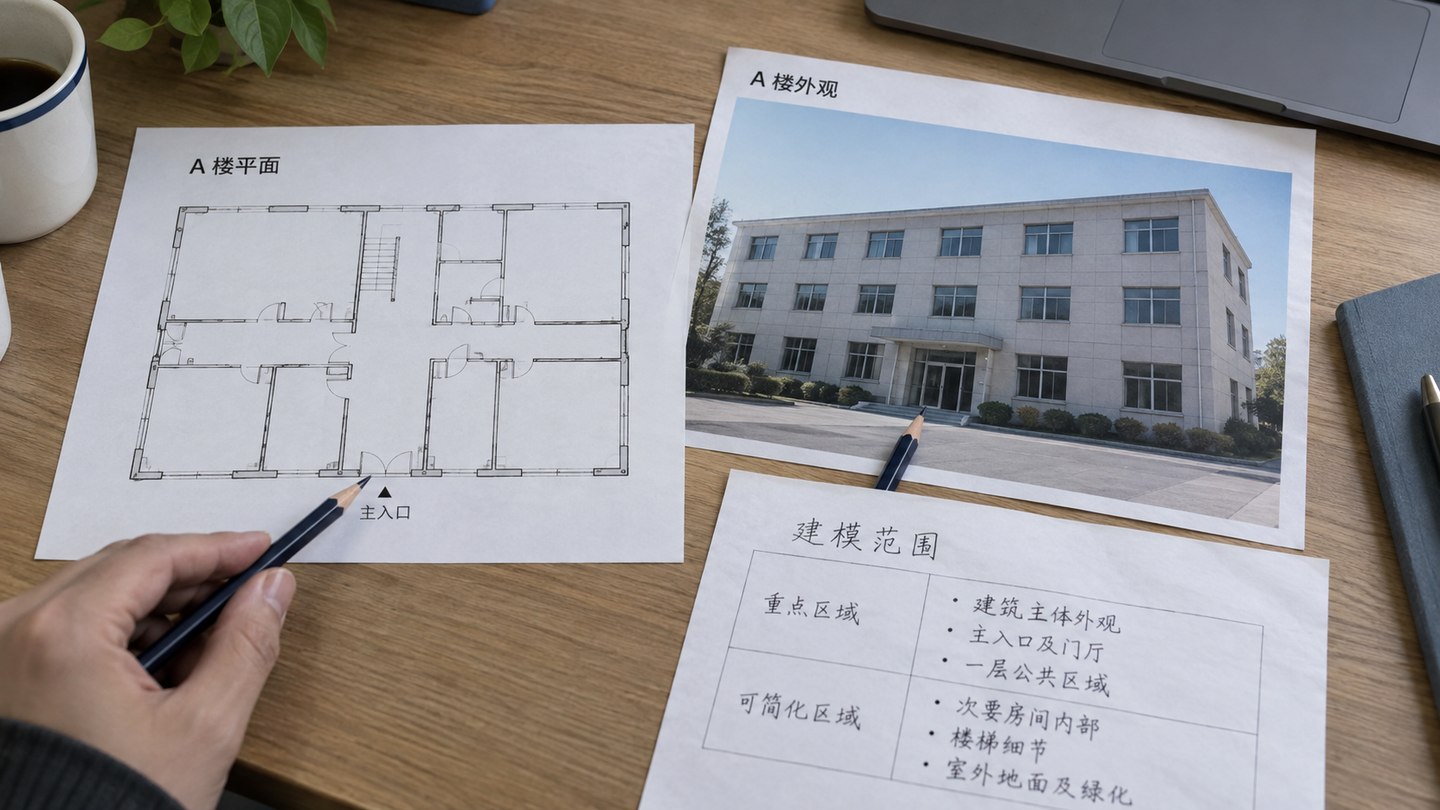
Spatial expression needs park or plant plans, building CAD, floor plans, equipment-room layouts, site photos, aerial views, video, existing 3D models and notes on important areas. Before reusing CAD, BIM or 3D files, check licenses, coordinates, object hierarchy and target devices. Start with the model-reuse assessment to inventory those assets.
Match plans and photos to the same objects and mark priority areas. Building A in the image shows how modeling scope and reference material can be checked together beforehand.
Not every area needs high-fidelity modeling. Mark core zones, key equipment, simplifiable areas and areas that do not need a model to control fidelity and budget.
3. Device Points and Business Objects
For device status, sensor data or alarm location, prepare an equipment inventory and point list with IDs, names, zones, floors, state fields, coordinates, camera IDs and responsible departments.
The point list connects 3D space to business data. Without it, a model can show space but cannot reliably show device status or exception location.
Digital twins commonly use ERP, MES, SCADA, IoT platforms, energy and security systems, video platforms, databases, APIs, MQTT, WebSocket or Excel registers. Confirm each source system, field definition, update frequency, integration method, authentication and test environment before starting.
If APIs are not available yet, sample tables and system screenshots can support a prototype, field design and simulated demo data.
5. Alarm, Video and Interaction Rules
An operations digital twin goes beyond “view data.” It may need to locate an exception, show video, open details, trigger a work order or record action. List alarm type and severity, triggers, handling steps, owners, stream addresses, camera locations and linkage rules.
6. Pages, Roles and Interactions
List required pages such as overview, zone and device details, alarm center, video, energy analysis, work orders and exports. State what each role can see; whether administration is needed; and whether filtering, search, walkthroughs, floor switching or time switching are required.
7. Deployment and Acceptance
Deployment inputs include display resolution, devices, server configuration, private or public access, domain certificates, database rights, security policy, account rules and operations ownership. Acceptance inputs include page, API and point inventories, model scope, performance criteria, deliverables and launch date.
Project Preparation Checklist
Material type
What to prepare
Why it matters
Project goals
Background, use cases, roles and reference cases.
Sets direction and page scope.
Spatial materials
Plans, CAD, floor plans, site and aerial photos.
Sets model scope and fidelity.
Device points
Equipment inventory, point list, zone ownership and state fields.
Links model, equipment and business data.
APIs and data
System inventory, API docs, samples and update frequency.
Sets integration difficulty and test scope.
Linked actions
Alarm severity, triggers, video resources and response workflow.
Supports alarm location, video links and work-order closure.
Deployment and acceptance
Server, network, security, display size and acceptance checklist.
Reduces rework at launch.
Can Work Start With Incomplete Materials?
Yes, but begin with a scope assessment, prototype and missing-materials list. Without full CAD, use plans, photos and priority-area notes for a lightweight proposal. Without an open API, use samples for a page prototype. If points are not listed, define the point-table fields and upkeep process first.
Before full development, bring critical materials to an acceptably verifiable state, especially model scope, data fields, point mapping, API rights and deployment.
Inputs Differ by Project Type
Park twins emphasize buildings, floors, parking, energy, security and operations. Factory twins emphasize lines, equipment, work orders, quality, inventory and energy. Energy-station twins emphasize topology, operating parameters, alarms and inspection. Command centers emphasize maps, incidents, resources, video and response workflows.
Frequently Asked Questions
Can a digital twin project start without complete CAD?
Scope assessment and lightweight solution design can start with plans, site photos, video, equipment lists and priority-area notes. High-fidelity models may still require CAD or site survey materials later.
What are the most important materials for a digital twin?
Usually the purpose, spatial inputs, device points, sources and acceptance goal. Display projects rely more on drawings and photos; operations monitoring relies more on APIs, point lists and alarm rules.
What should happen when materials are incomplete?
Clarify requirements, prototype pages and list missing materials. State what can be demonstrated now and what must wait for APIs, points or deployment conditions.