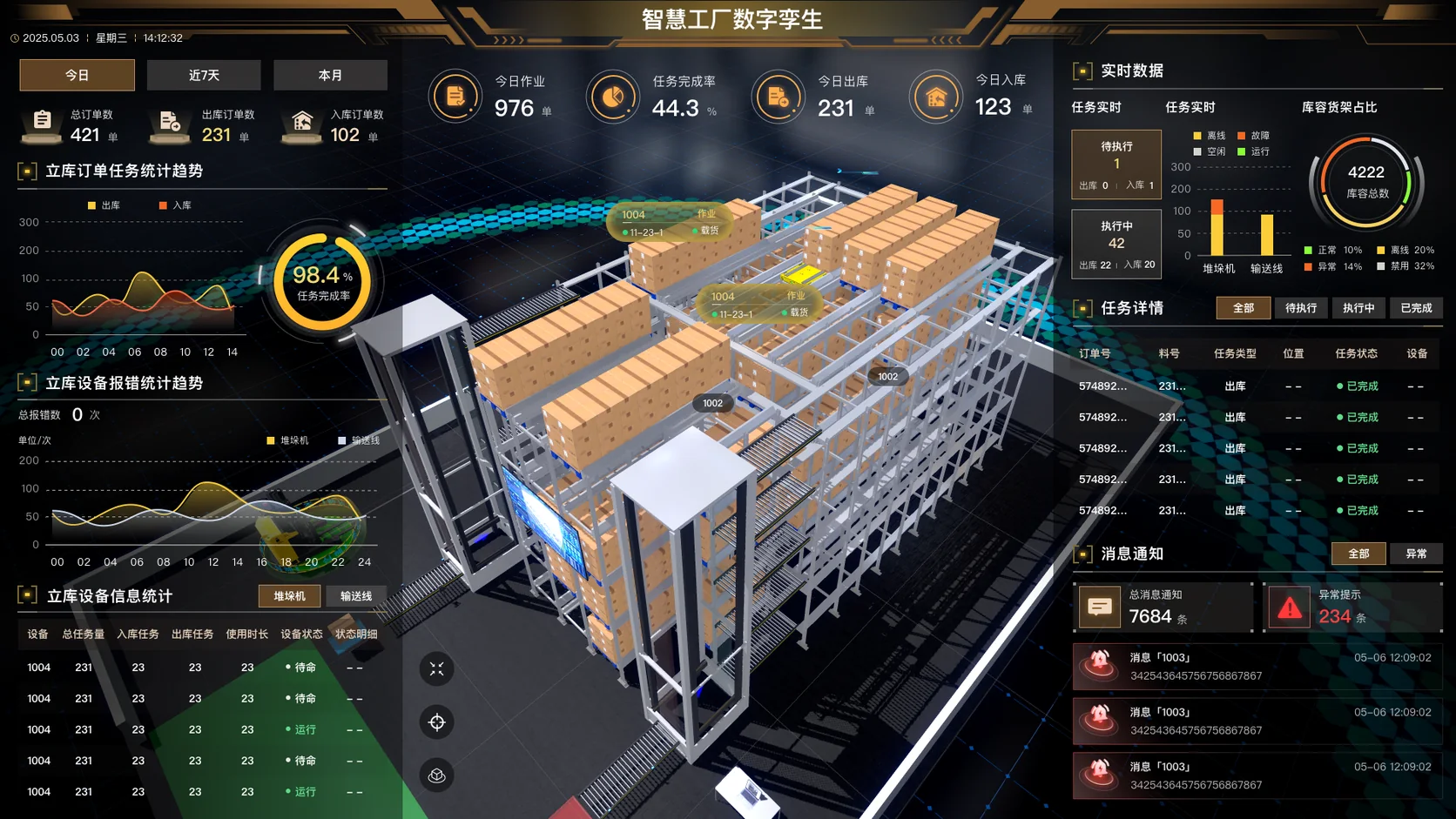
Smart factory warehouse digital twin: racks, tasks and equipment together
An automated warehouse scene links inbound, outbound and transfer orders, stacker and conveyor tasks, locations and stock, equipment status, exceptions, task detail and messages, so order tracking and equipment location share one view.
Industry
Smart factory, automated warehouse and logistics center
Page type
3D digital twin with orders, tasks, equipment and exceptions
What was delivered
Project source files, code and 3D models
The overview centers on the 3D warehouse. Orders and equipment trends sit on the left. Live tasks, capacity, task detail and exception messages sit on the right.
See where an order is stuck and where the equipment is
Tasks and equipment
Both sides show inbound trend, tasks waiting and in progress, and stacker and conveyor status, so progress and equipment can be compared in one view.
Warehouse space
The central 3D rack places shelves, equipment and status labels in the warehouse, so site and office staff can talk about the same location. Capacity is a daily reference.
Watching exceptions
Task status, equipment error trends and exception messages are shown together as leads to check. When a task is late, the related equipment and location can be checked against the business record.
What this project delivered
Project source files
Code
3D models
This page is a desensitized view of a real project. Orders, tasks, materials, locations, stock, equipment IDs, people, times, completion rates and exception counts explain the interface. They are sample or desensitized information, not the customer’s current data, and not a conclusion about go-live, warehouse efficiency or acceptance.
Before connecting a live warehouse, agree the objects and the page scope
Agree location and equipment codes, stock and batch fields, inbound, outbound and transfer flows, task states and alarm rules, then set what WMS, WCS, PLC and the visualization platform may read or write. The table below lists page content that can be agreed and where it usually comes from.
Object
Usual source
Page content that can be agreed
Orders and stock
WMS, ERP, MES, and stock and material master data.
Inbound, outbound, transfer and count orders; quantity, status, completion, priority, handling time, batch and location changes.
Execution tasks
WCS, the dispatch service, the task queue and the state machine.
How a business order, a WCS task and an equipment subtask correspond; current step, position, material, carrier, command, feedback, previous and next state, timeline, result and failure reason.
Automated equipment
PLC, stacker, conveyor, lift, shuttle and scanner.
Mode, position, load and cycle time; running, idle, offline, fault and communication state shown separately.
3D objects
Warehouse model, BIM or 3D model, object map and coordinates.
Zone, aisle, rack, location, goods, carrier and equipment position; selection, status highlight and task location.
Exceptions and messages
Equipment alarms, task timeouts, stock differences, manual interventions and the notification center.
Blocked tasks, location conflicts, scan failures, communication loss and recovery; business notices separated from exceptions, filtered by level, equipment, task and handling state.
Operations and reports
Operation logs, task history and the statistics service.
Today’s work, inbound and outbound volume, task completion, capacity use, equipment load and error trend; performance analysis and audit trace as agreed.
How to confirm the connection, from object mapping to process replay
Acceptance checks orders, tasks, equipment, stock and 3D objects one by one. A representative flow checks state sync, task order and exception prompts, then interface logs, site status and test records.
Codes and model: Confirm unique codes for zone, aisle, row, column, level, location, equipment, carrier, material, order and task. Check object position, model precision, version, coordinate system and how often status updates.
Flow and state: Set the entry, states and end condition for inbound, outbound, transfer, count, replenishment, exception recovery and manual intervention. Check that the flow, the state machine and the systems agree.
Interfaces and stability: Check network zones, authentication, field mapping and read or write paths for WMS, WCS, PLC, MES and the model service. Verify signals, sampling, refresh, idempotency, delay, resume, bad data, reconnect and continuous running.
Permission and control: Separate browse, dispatch, maintenance, manual tasks and equipment control. Where control is included, confirm interlock, authorization, a second confirmation, command feedback, rollback and audit.
Exception replay: Use offline equipment, faults, blocked tasks, location conflicts, scan failures, communication loss and manual recovery to check prompts, alarm rules, notice delay, handling records and recovery.
Records and handover: Check stock and position against WMS or WCS records, PLC feedback, equipment logs, counts and process replay. Keep the agreed requirements, equipment list, owner confirmation, changes, and test and acceptance sign-off. Interface and deployment records stay with the project.
Questions
Does the digital twin replace WMS or WCS?
Usually no. The platform can summarize orders, tasks, stock, equipment, alarms and 3D position while WMS, WCS, PLC and the equipment controls remain. Replacing an existing system is a separate decision about interfaces and business boundaries.
How does a 3D location stay consistent with stock?
Zone, aisle, row, column, level, location and carrier need one coding scheme, synchronized and checked against WMS or WCS results, equipment feedback and counts, with a list of differences.
Can the 3D scene drive a stacker directly?
The 3D page can offer a controlled entry, but the command should go through the WCS or PLC interlock, permission and feedback. The page should not bypass the site control layer for a high-risk action.
How is a warehouse digital twin accepted?
Choose representative flows such as inbound, outbound, transfer, exception recovery and manual intervention, and replay them against the order, task, equipment state, location change, alarm, log and 3D object.
Preparation and where it applies
Floor plans, equipment and location lists, WMS or WCS interfaces, task flows, 3D models and network conditions can be prepared first. Then confirm the pages, connected systems and acceptance scenes for the first phase.